👑 FamOrbit Premium: Try 7 Days Free • Only $2.99/mo after • Manage all family devices! View Plans →
🪐
FamOrbit Parental Control
🛡️ Built for Modern Digital Parenting • Google Play Compliant

Empower Balanced Habits with FamOrbit

Effortless screen time boundaries, per-app limits, automated bedtime focus, and sub-second parental approvals — built with uncompromising privacy.

✓ 100% Ad-Free
✓ No Third-Party Data Selling
✓ Sub-Second Cloud Sync
✓ Tamper-Proof Protection
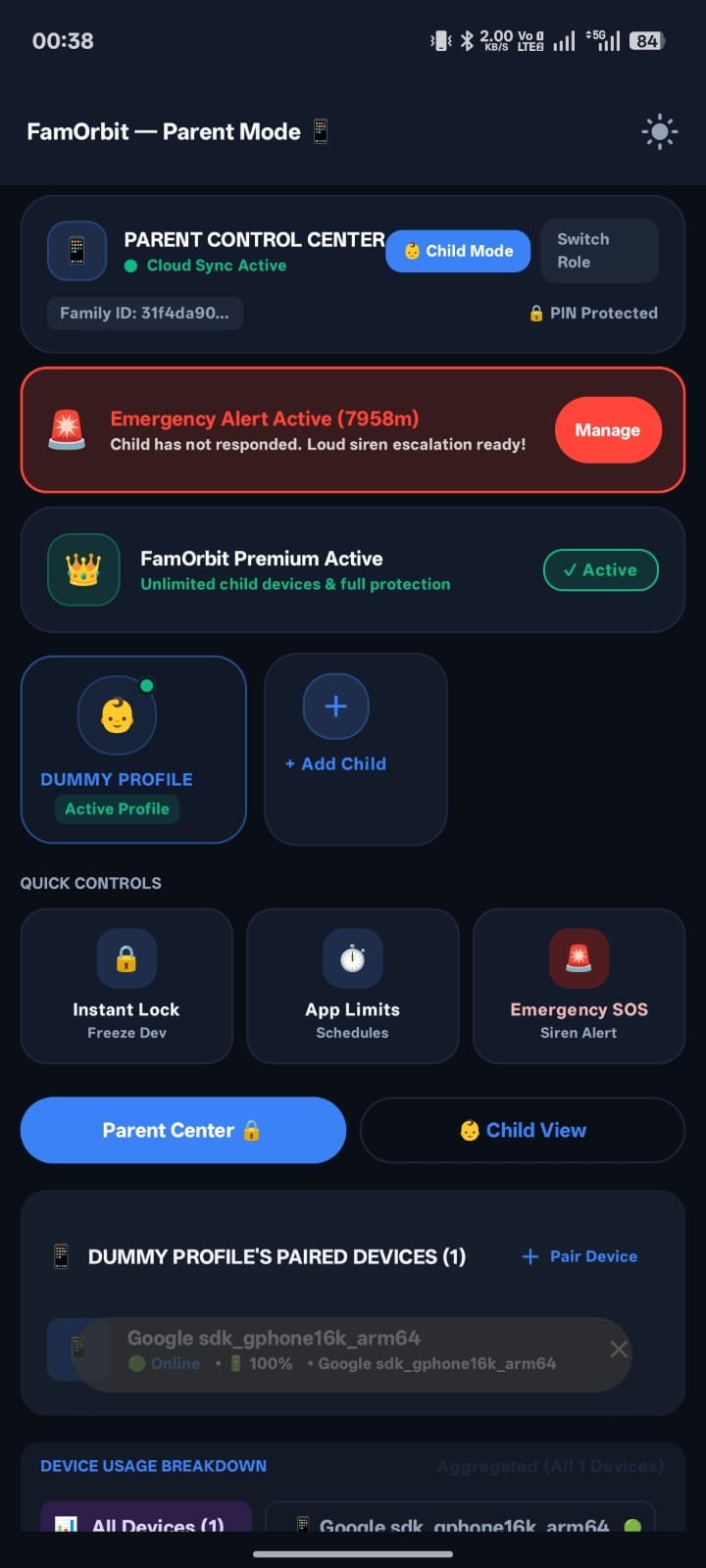
FamOrbit Parent Dashboard Screen
▲ Live Parent Command Center with Instant SOS Alert
Quick & Easy Setup

How to Set Up FamOrbit in 3 Minutes

No complex cables or root access required. Pair parent and child devices wirelessly with a 6-digit code.

1

Install on Parent Device

Download FamOrbit, select "This is a Parent Phone", and set your private 4-digit Security PIN. Tap + Add Child to generate a pairing code.

Step 1: Parent Hub
2

Pair Child Device

Install FamOrbit on your child's phone or tablet, select "Child Device", and type the 6-digit code shown on your parent phone.

Step 2: 6-Digit Code
3

Enable Smart Guards

Follow the on-screen wizard to enable Accessibility Service and Usage Access. Set daily screen limits and bedtime routines instantly!

Step 3: Instant Protection
📱 Real Android App Interface

Designed for Clarity. Built for Control.

Explore FamOrbit's clean, distraction-free native screens — from instant remote locks to per-app usage curves.

Parent Dashboard & SOS Alerts
Parent View

Parent Command Center

Real-time status of paired devices with 1-tap Remote Lock and high-priority Emergency SOS escalation.

App Limits and Daily Quotas
Quotas

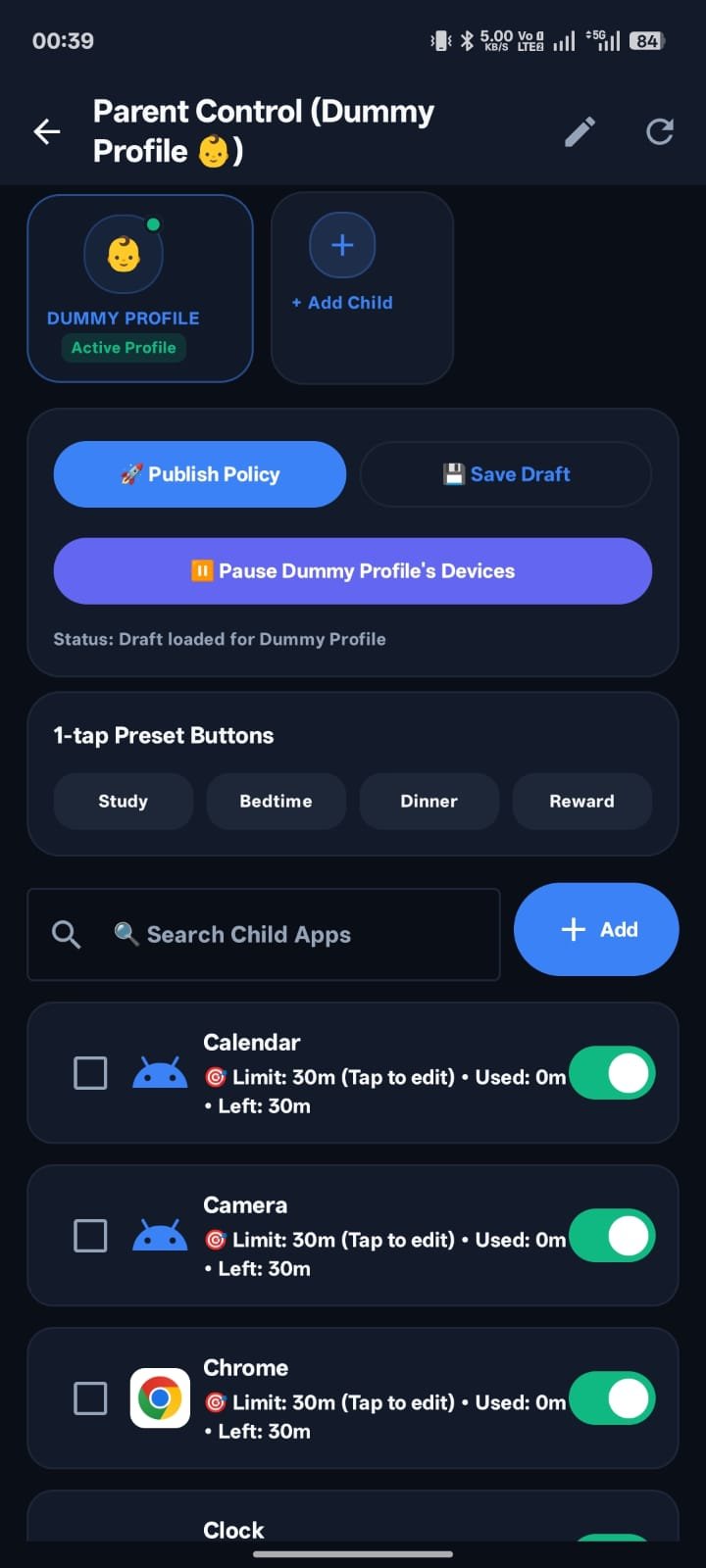
Granular App Limits

Set individual daily timers for YouTube, TikTok, and games with friendly "Time's Up" overlay screens.

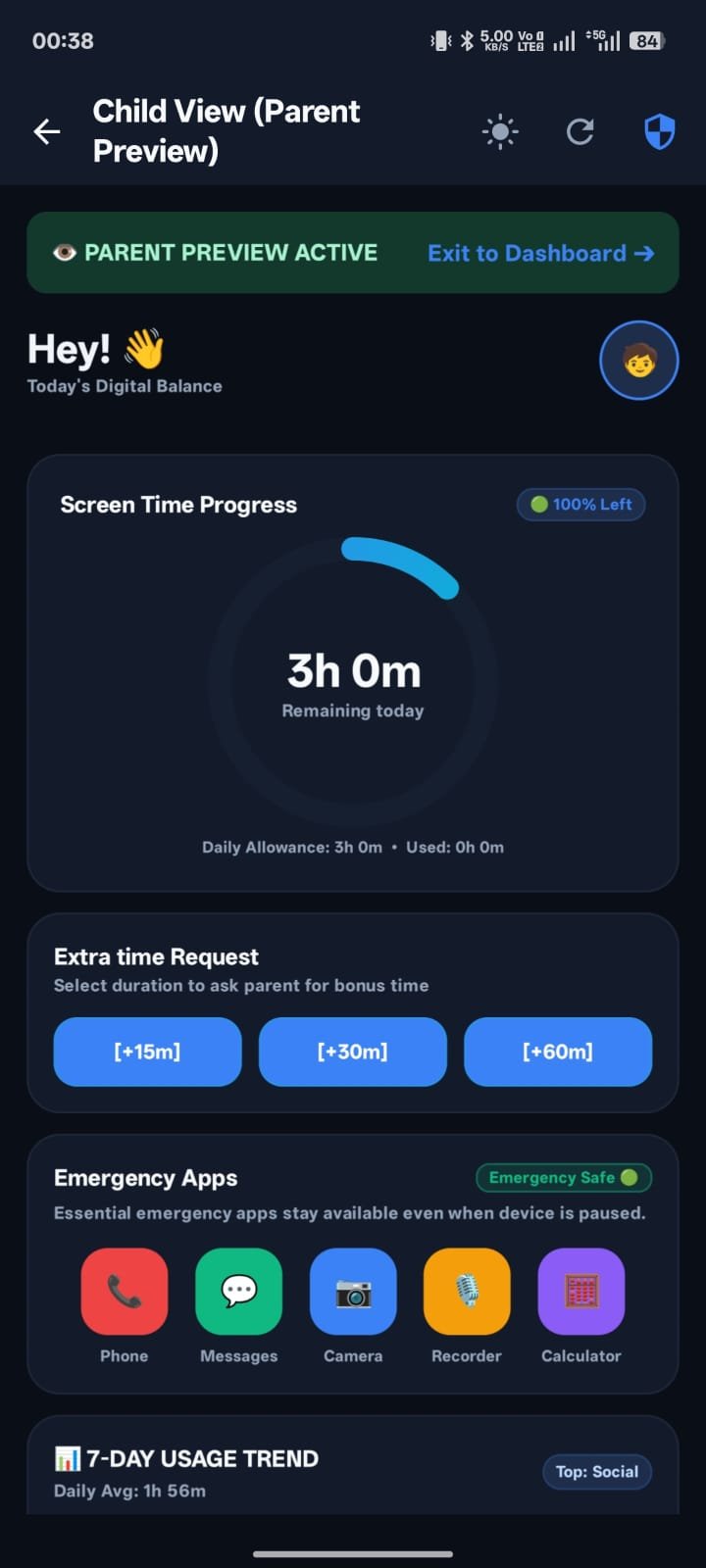
Child View Screen Time
Child Device

Child Dashboard & SOS

Transparent time-remaining countdown, Piggy Bank habit bonus claims, and one-tap Emergency SOS trigger.

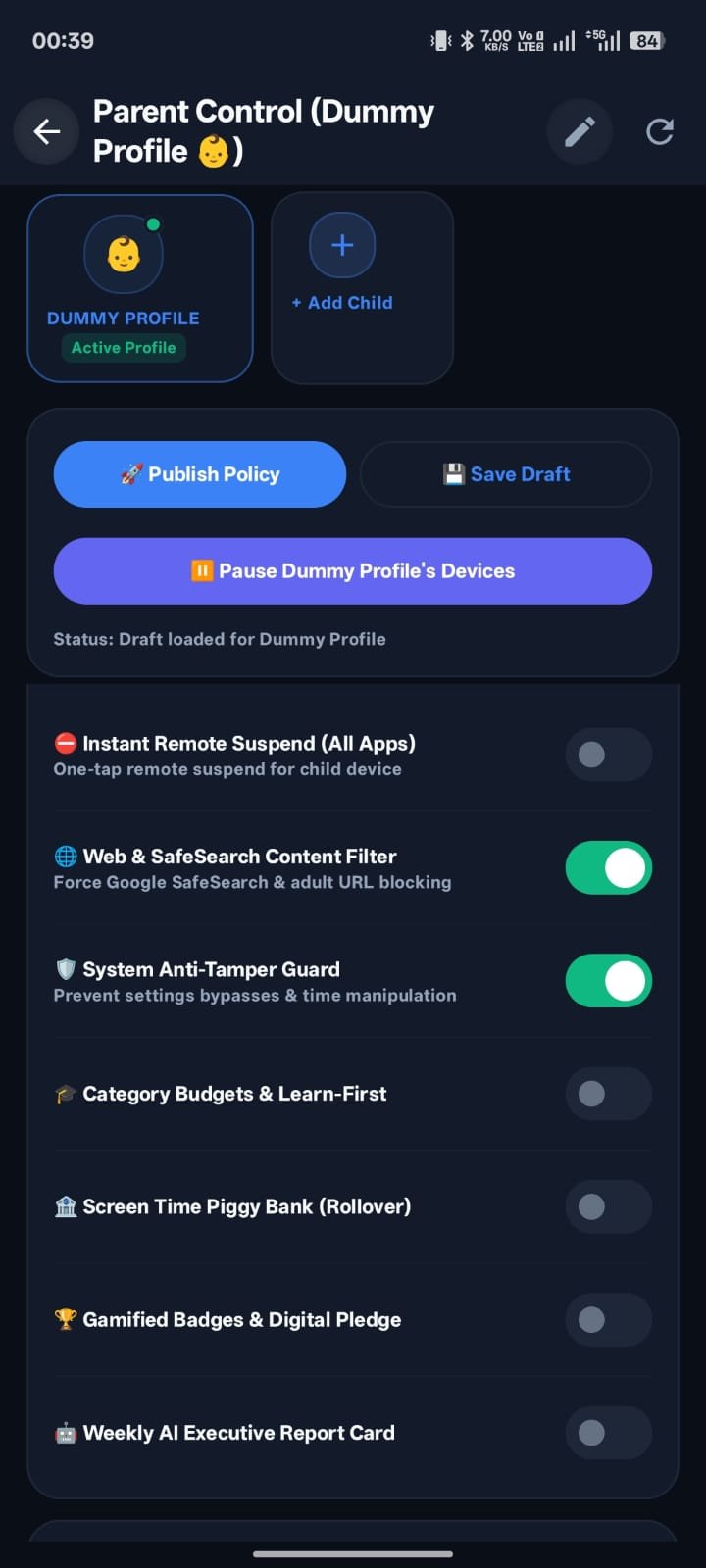
Parent Safety Switches
Anti-Tamper

Security & PIN Controls

Prevents unauthorized uninstallation, time-tampering, and force-stopping via Device Admin enforcement.

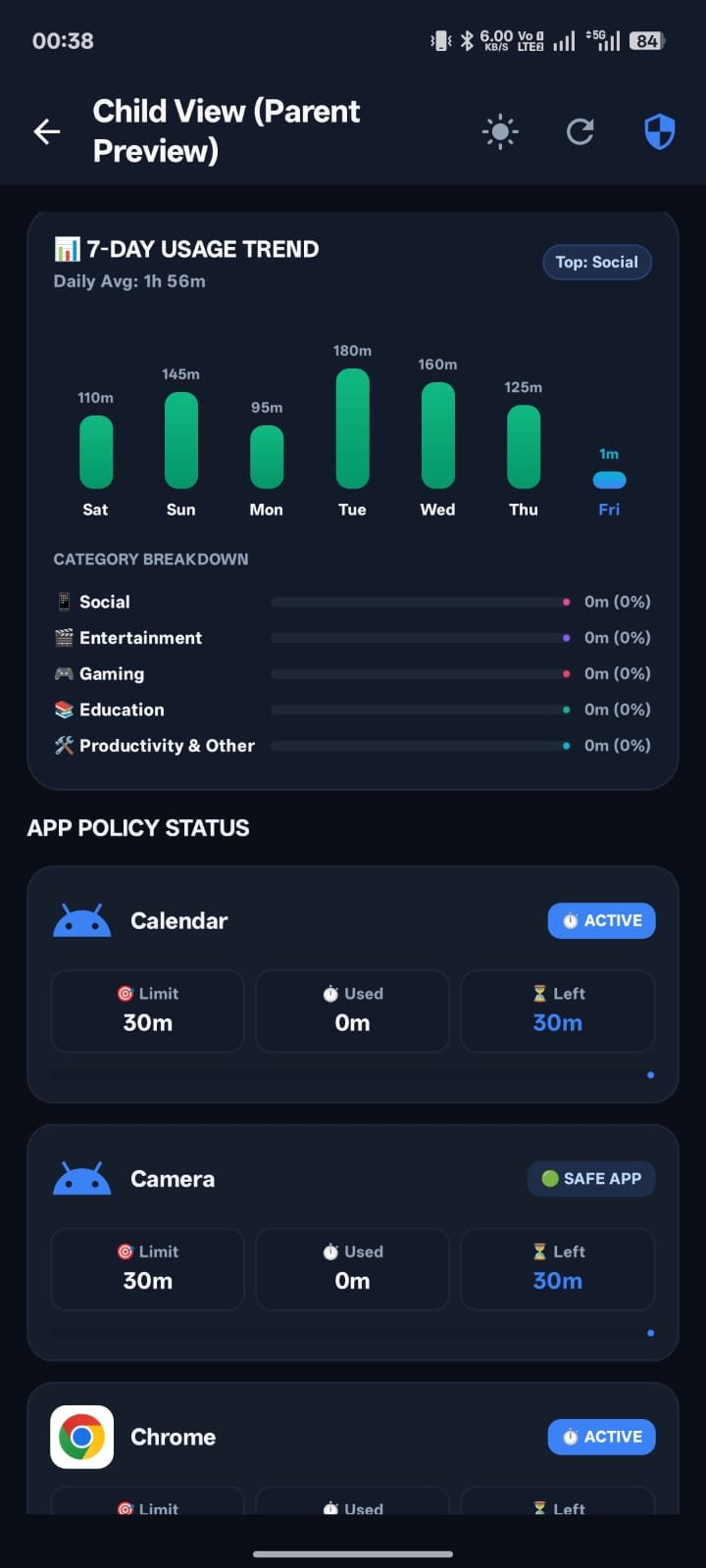
Daily Usage Trends
Analytics

Weekly Usage Analytics

Visual breakdowns of screen time by category, helping families celebrate healthy offline milestones.

Uncompromising Control

Features Built for Peace of Mind

Designed in collaboration with family psychologists and mobile security engineers.

⏳

Granular App Time Limits

Set customized daily limits for YouTube, Roblox, TikTok, games, and social media. When time expires, friendly blocker screens guide children to offline play.

🔒

Instant Remote Lock & SOS

Dinner time or family study hour? Freeze all child devices with one tap from your phone. Receive high-priority SOS alerts instantly.

🌙

Bedtime & Focus Routines

Automate wind-down schedules. Apps lock down automatically during bedtime hours, ensuring healthy sleep habits without bedtime arguments.

🔔

Live Extra Time Approvals

Kids can request +15 or +30 minutes for homework. Parents receive instant push notifications and can approve or decline with a single tap.

🛡️

Anti-Tamper & Auto-Restart

Prevents force-stopping, unauthorized uninstallation, and time-tampering via Device Administrator and Accessibility protection.

🐷

Piggy Bank & Habit Rewards

Encourage positive habits. Kids can earn bonus minutes by completing chores, reading books, or honoring digital wellness pledges.

Simple & Honest

Affordable Pricing for Every Family

Try full premium features free for 7 days. Cancel anytime with zero commitment in Google Play.

Starter

Free Plan

$0 / forever

Essential protection for single child devices.

  • ✓ 1 Child Device / Profile
  • ✓ Daily Total Screen Limit
  • ✓ Instant Remote Lock
  • ✓ Basic Tamper Protection
  • ✕ Per-App Time Limits
  • ✕ Unlimited Child Profiles
Get Started Free
⭐️ Most Popular • 7-Day Free Trial
Annual Protection

FamOrbit Premium

$19.99 / year Save 45%

Includes 7-Day Free Trial, then $19.99/yr (~$1.66/month).

  • ✓ Unlimited Child Profiles & Devices
  • ✓ Per-App Limits & Time Budgets
  • ✓ Bedtime & Focus Automated Routines
  • ✓ Live Extra Time Approval Engine
  • ✓ Habit Rewards & Digital Pledge
  • ✓ Priority Cloud Push Synchronization
Start 7-Day Free Trial
Flexible

Monthly Premium

$2.99 / month

Cancel anytime in Google Play Store subscriptions.

  • ✓ Unlimited Child Profiles & Devices
  • ✓ Per-App Limits & App Schedules
  • ✓ Bedtime Focus Routines
  • ✓ Instant Remote Lock & SOS
  • ✓ Real-Time Cloud Approvals
Subscribe for $2.99 / mo

*Subscriptions are managed safely via Google Play Billing. Local taxes may apply depending on your region.

Have Questions?

Frequently Asked Questions

How does FamOrbit enforce app limits and prevent uninstallation? ↓

FamOrbit uses the Android AccessibilityService API and Device Administrator API with explicit parental consent. These APIs allow the app to detect foreground application launches, calculate remaining daily budgets, and display polite blocker overlays when limits are reached, while preventing unauthorized uninstallation or force-closing.

How do I cancel my subscription or free trial? ↓

You can manage or cancel your subscription at any time directly through Google Play: Open the Google Play Store app → Tap your profile icon → Payments & subscriptions → Subscriptions → Select FamOrbit → Tap Cancel subscription. If cancelled during the 7-day trial, you will not be charged.

Is my family's data safe and private? ↓

Yes. We strictly adhere to Google Play Families Policy, COPPA, and GDPR. We never sell or share family usage data with advertisers or third parties. All cloud communication is secured via end-to-end TLS encryption. You can delete your family account and all associated data at any time in one tap.

What happens if my child tries to change the device time or timezone? ↓

FamOrbit includes built-in tamper detection (TimeChangeReceiver and monotonic system clocks) that prevents clock manipulation from resetting daily screen time quotas.

Start Building Healthy Screen Time Today

Join thousands of parents who trust FamOrbit to bring balance and peace of mind to digital family life.